Campus Information Systems Installation
Campus Information Systems Installation
Campus IS installation across teaching and admin buildings: campus MDF, per-building IDFs, phased testing and handover packs for campus IT.
Project context
- Setting: Mainland campus-style education or training campus
- Scale: Multi-building campus with teaching/admin blocks
Challenge
A campus needed coordinated information systems installation across teaching and administration buildings: classroom/office drops, distributor rooms, and selective hooks for access or wireless. Schedules followed academic calendars—noisy work windows were constrained.
Environment
- Multiple buildings with independent IDFs feeding a campus MDF or computer room
- Mix of renovated heritage wings and newer blocks (pathway quality varies)
- Stakeholders: campus facilities, IT office, sometimes municipal inspection for weak-current completion
- Students/staff occupancy during term—prefer holiday or night cuts for backbone
Solution architecture
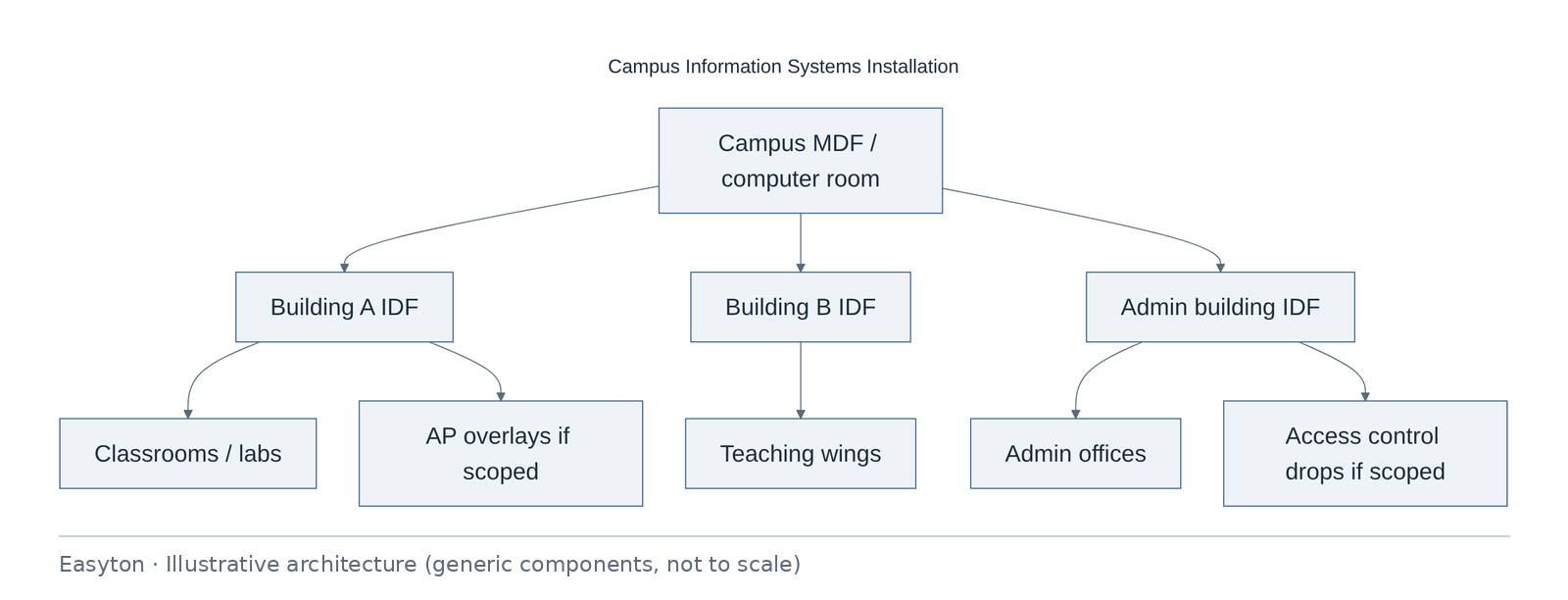
Text view of the architecture (each line: component → what it connects to):
Campus MDF / computer room → Building A IDF, Building B IDF, Admin building IDF
Building A IDF → Classrooms / labs, AP overlays if scoped
Building B IDF → Teaching wings
Admin building IDF → Admin offices, Access control drops if scoped
Technical highlights
Hierarchy
- Campus MDF as aggregation; per-building IDF; classroom/office work areas.
- Fiber preferred for inter-building backbone when distance/EMI warrants; copper within floors.
Segmentation hooks (education-typical)
- Recommend logical separation candidates: admin · teaching · guest/event · IoT/access—implemented by campus IT policy, not implied by cabling alone.
- Classroom demo ports labeled distinctly from staff ports.
Access & Wi‑Fi (when in SOW)
- Door drops and AP drops shown on plans as separate legends.
- ACS controllers reside on dedicated VLAN recommendation; lock power is electrical scope unless PoE locks specified.
Standards & testing
- Category per building standard or Easyton default stated in quote.
- Test records filed per building for phased handover.
Operations
- Handover includes who patches classroom MAC vs who owns holiday shutdowns.
- Spare port allowance documented as a design assumption.
Implementation steps
- Campus survey per building (IDF, riser, classroom sample).
- IS installation plan + boundary matrix.
- Quotation / phased SOW by building.
- Backbone then horizontal per release calendar.
- Label/test per building.
- Optional AP/ACS hang coordination.
- Campus summary pack + training for local IT.
Acceptance
| ID | Criterion |
|---|---|
| C1 | Each contracted building has as-built + tests |
| C2 | Inter-building links verified |
| C3 | Label scheme consistent campus-wide |
| C4 | Boundary matrix acknowledged |
| C5 | Snag list cleared or dated |
Deliverables
- Campus IS plan
- Per-building as-builts
- Test packs
- Label schedules
- Optional ACS/AP schedules
- Handover training notes
Outcome
Campus information systems installation completed for contracted buildings with phased documentation suitable for campus IT.
Related
Easyton has delivered IT infrastructure and support projects since 2009. Planning something similar? Contact Easyton to discuss your requirements.