
Corporate Website Build and Maintenance Delivery
Corporate Website Build and Maintenance Delivery
Corporate website build and maintenance: IA, CMS build, technical SEO baseline and handover of DNS, hosting and analytics access.
Project context
- Setting: Corporate site for China/international audience
- Scale: SMB–mid corporate brochure or service site
Challenge
Companies need a corporate site build plus a clear maintenance model (content updates, uptime monitoring basics, plugin/core updates for CMS). Marketing teams often want SEO promises; this case documents verifiable build and handover artifacts instead.
Environment
- Brand assets from client
- Hosting may be Easyton-managed or client-owned
- Bilingual pages sometimes required
- Domain/DNS ownership must be explicit at handover
Solution architecture
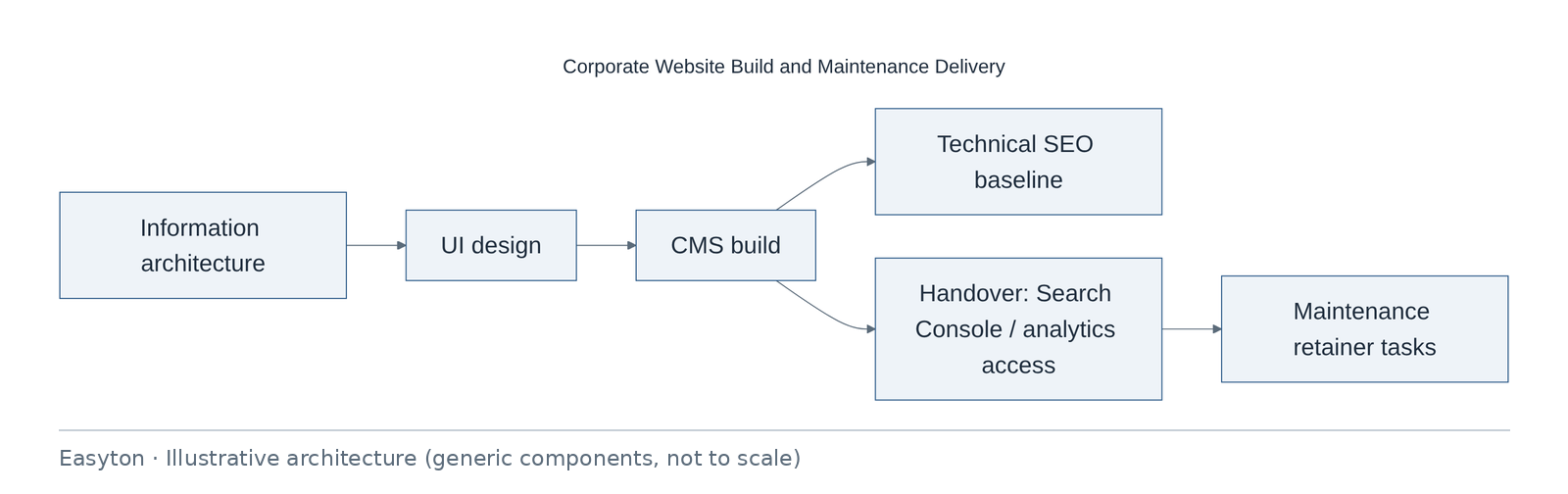
Text view of the architecture (each line: component → what it connects to):
Information architecture → UI design
UI design → CMS build
CMS build → Technical SEO baseline, Handover: Search Console / analytics access
Handover: Search Console / analytics access → Maintenance retainer tasks
Technical highlights
Build characteristics
- IA / navigation agreed before visual polish.
- CMS roles: admin vs editor.
- Staging vs production discipline.
Technical SEO baseline (verifiable)
- Title/meta templates · sitemap · robots · HTTPS · basic CWV hygiene as implemented
- No guaranteed rankings or traffic outcomes.
Maintenance catalog examples
- CMS/core/plugin updates · backups · uptime checks · content edits within hours budget · security patches
Handover
- DNS ownership · registrar · hosting panel · Search Console · analytics—with named client owners.

Implementation steps
- Discovery
- IA
- Design approve
- Build
- Content load
- QA
- Launch
- Handover checklist
- Optional maintenance start
Acceptance
- Pages match IA
- Forms deliver test mail
- HTTPS valid
- Access credentials transferred
- Maintenance scope signed if purchased
Deliverables
- IA
- Design comps
- CMS site
- Technical SEO baseline notes
- Handover checklist
- Maintenance SOP
Outcome
Corporate site launched with explicit handover of admin/SEO tool access and an optional maintenance catalog.
Related
Easyton has delivered IT infrastructure and support projects since 2009. Planning something similar? Contact Easyton to discuss your requirements.