
Enterprise Wi-Fi AP Overlay and SSID Design
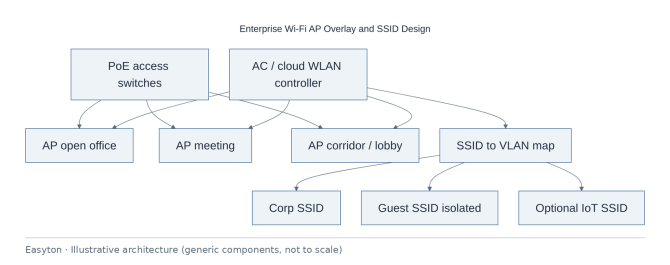
Enterprise Wi-Fi AP Overlay and SSID Design
Enterprise Wi-Fi AP overlay: placement from seating density, PoE readiness, SSID-to-VLAN map, guest isolation and walk tests.
Project context
- Setting: GBA Grade-A / standard office
- Scale: Multi-SSID enterprise office WLAN
Challenge
Offices hang APs without SSID/VLAN design, then blame “Wi‑Fi” for DHCP or firewall issues. This case documents an AP overlay: placement sketch, PoE switch readiness, SSID→VLAN map, guest isolation, and acceptance walk tests—without unverified coverage claims.
Environment
- Open office, meeting rooms, corridors
- PoE access switches in IDF
- Controller on-prem AC or cloud-managed
- Guest and corp devices coexist
Solution architecture
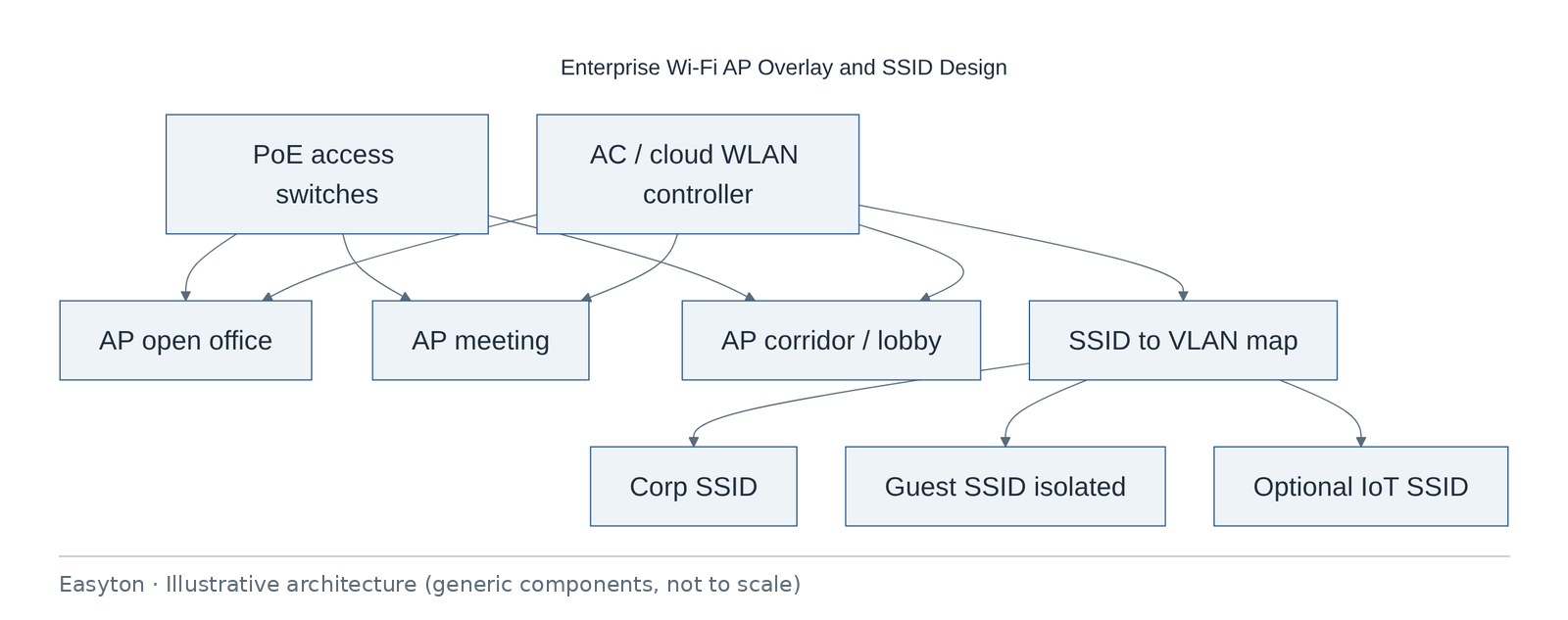
Text view of the architecture (each line: component → what it connects to):
AC / cloud WLAN controller → AP open office, AP meeting, AP corridor / lobby, SSID to VLAN map
PoE access switches → AP open office, AP meeting, AP corridor / lobby
SSID to VLAN map → Corp SSID, Guest SSID isolated, Optional IoT SSID
Technical highlights
RF / placement characteristics
- Placement from seating density and wall types; formal predictive survey optional.
- Coverage is verified by walk test, not promised as a guaranteed figure.
- Channel/power tuned post-install.
PoE & cabling
- Cat drops to AP mounts; spare drop recommended at hard ceilings.
- PoE budget includes AP peak draw.
SSID design
- Corp (802.1X or PSK as client standard) · Guest (isolation, portal optional) · IoT (narrow ACL).
- SSID names in documentation use generic labels (“Corp”, “Guest”).
Security
- Management plane not on guest.
- Disable obsolete protocols per client baseline.
Implementation steps
- Requirements → AP sketch on plan → PoE readiness → Hang & adopt APs → SSID/VLAN → Walk test
- fix → Document
- handover
Acceptance
- APs online on controller
- Sample corp auth works
- Guest cannot reach corp subnet in smoke test
- Roaming acceptable in agreed paths (qualitative)
- Heat-map optional deliverable if surveyed
Deliverables
- AP schedule
- SSID/VLAN matrix
- Controller summary
- Walk-test notes
- As-built AP plan
Outcome
Enterprise Wi‑Fi overlay delivered with SSID design and walk-test notes.
Related
Easyton has delivered IT infrastructure and support projects since 2009. Planning something similar? Contact Easyton to discuss your requirements.