
Office Network Commissioning with IP Allocation Options
Office Network Commissioning with IP Allocation Options
Office network commissioning with OPTION A/B IP plans, a VLAN and DHCP workbook, switch bring-up checklist and rollback files for HQ audit.
Project context
- Setting: Mainland office (GBA corridor typical)
- Scale: Single-site office post-cabling or partial refresh
Challenge
After cabling or a partial refresh, the office needed network commissioning with a clear IP plan. Decision-makers requested OPTION A / OPTION B (e.g. flat vs segmented addressing) plus an IP workbook HQ could audit. Without this, printers, guests, and IoT devices collide on one subnet and troubleshooting becomes tribal knowledge.
Environment
- Existing or newly installed copper plant to IDF
- Mixed vendor access switches; firewall/VPN edge may be HQ-owned
- Wireless APs present or pending
- Local admin + overseas HQ IT both need the same spreadsheet
Solution architecture
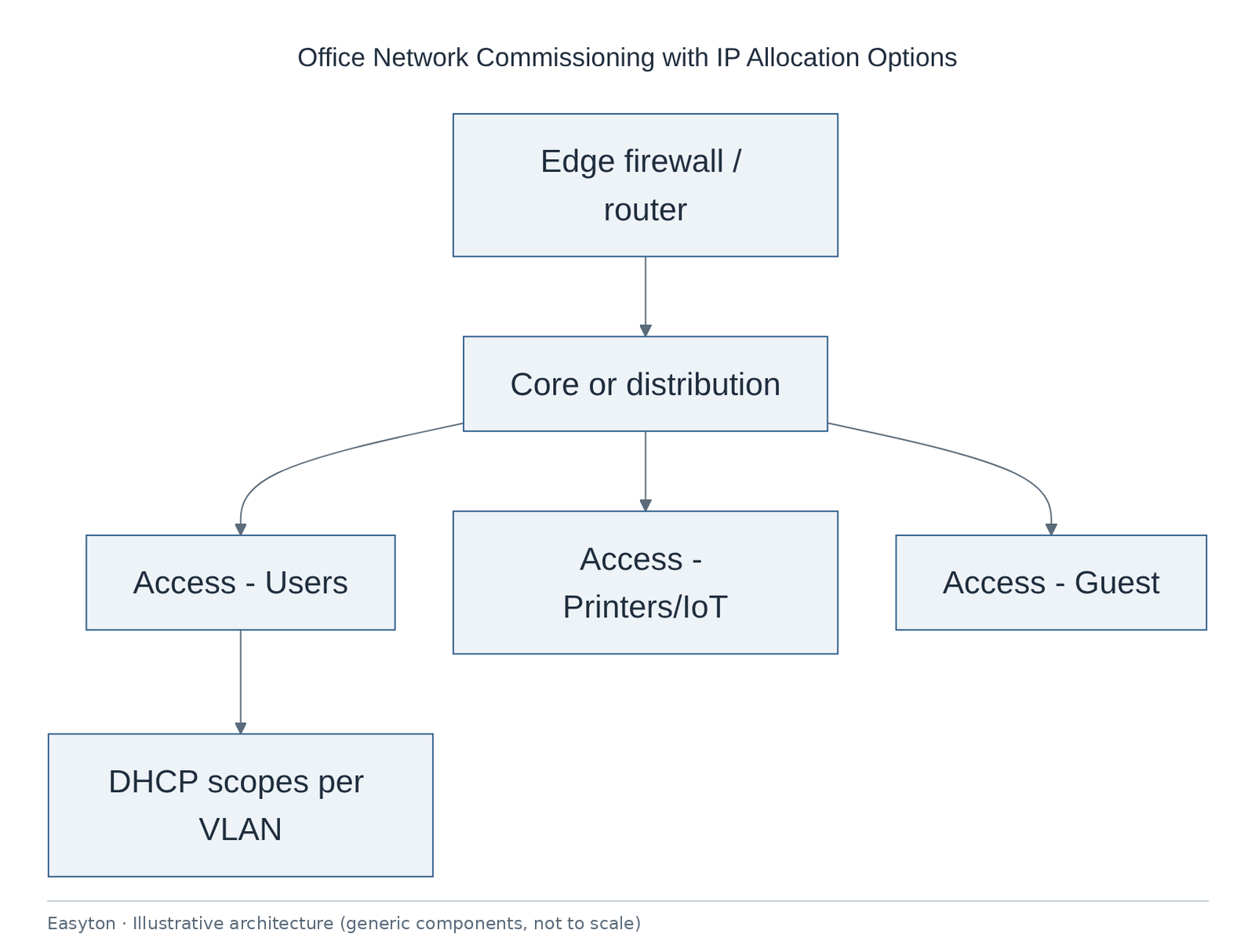
Text view of the architecture (each line: component → what it connects to):
Edge firewall / router → Core or distribution
Core or distribution → Access - Users, Access - Printers/IoT, Access - Guest
Access - Users → DHCP scopes per VLAN
OPTION A — Minimal change: keep addressing philosophy; document cleanup only.
OPTION B — Segmented: user / printer / voice / IoT / guest VLANs; inter-VLAN rules owned by client firewall team unless scoped.
Technical highlights
Addressing and DHCP
- Workbook fields: Site · VLAN ID · name · CIDR · gateway · DHCP range · static ranges · remarks.
- Static reservations categorized (printers, controllers)—role-based labels rather than employee names.
- DNS/DHCP authority clearly marked (on-prem vs HQ).
Switching
- Bring-up checklist: management IP, uplink, allowed VLANs, optional LACP, config save point before change.
- Hostnames in documentation use role-based labels (e.g.
SW-FL2-A).
Wireless mapping
- SSID → VLAN table included when APs are in scope.
- Guest isolation smoke test only if design includes guest SSID.
Security zoning
- Segmentation is a policy outcome of OPTION B; cabling alone does not isolate traffic.
- VLAN work alone is not presented as a compliance certification.
Resilience
- Config rollback files taken before changes; dual-uplink only if physically present.
Implementation steps
- Discovery of current subnets, DHCP, DNS, VPN edge ownership.
- Draft OPTION A/B memo with trade-offs (ops complexity vs isolation).
- Approve option; build IP workbook.
- Save switch/firewall configs.
- Implement VLAN/DHCP changes in window.
- Wired + wireless verification samples.
- HQ handover summary.
Acceptance
| ID | Criterion |
|---|---|
| N1 | Chosen OPTION documented and approved |
| N2 | IP workbook complete for in-scope VLANs |
| N3 | Sample clients receive DHCP as designed |
| N4 | Printer/IoT reachability matches policy |
| N5 | Rollback files retained |
Deliverables
- OPTION A/B memo
- IP allocation spreadsheet
- Commissioning checklist
- Switch inventory
- HQ summary
Outcome
Network commissioned against an agreed IP option with HQ-auditable allocation table.
Related
Easyton has delivered IT infrastructure and support projects since 2009. Planning something similar? Contact Easyton to discuss your requirements.